How Can Laser Labels Help?
Addressing envelopes can become a very tedious, hand cramping job, especially if you list contains more than a hundred people. Small businesses owner, large businesses owner, bride to be, party-animal, mother to be, can all enjoy the benefits of having the addresses printed out as opposed to hand written. It can save you hours and hours of sitting at the desk writing, and re-writing addresses with pen and ink, throwing away envelopes after envelopes because of mistakes. With the use of laser labels, you can print out the addresses, peel them and stick them on envelopes. This can decrease the time it takes as well as prevent needless waste of envelopes because you can now check the correctness of the addresses before printing. There are two questions to address in order to understand how easy it is to do this.
1) How does one get the address digitally?
The classic way of doing this is to go through your address book or list and type them in. Be sure to use a spreadsheet program in a certain format described below to avoid double work. Another way to obtain addresses these days is to use the communication technology available. You can obtain the addresses of people digitally either through email or chat or social network sights. There is no shame in asking people to give you their updated address online. This may even be that very rare time that a mass email is acceptable. Once the email arrives, enter their addresses into the spreadsheet.
2) How do I get the addresses on the label?
Now that you have all the addresses collected in your spreadsheet (Microsoft Word), you can use the “mail merging” which is available in Microsoft Word to create your address labels. In short, mail merging is a very handy script that comes with Microsoft Word that automates bringing in addresses from an Excel file and formts them into label templates that fit into the size of your selected laser labels. Details of mail merge can be found here.
Honestly, it may feel like it takes more time as you start this process, however, once this process is down, you will see the bennifits and ease.
Filed under: Blank Label Uses on July 28th, 2009 | No Comments »
Choosing Laser Labels That Work With Your Printer
When Buying laser labels, there are a few things to consider. First, you’ll need to decide what label size you need, and next to see if the printer is capable of printing on the labels. If you are printing simple text or a graphic within the label, most printers will have no problems printing them. However, if you are looking to print laser labels that are what the industry calls “full bleed”, which means that your label design completely covers all of the label with color, graphic, or text, you may find that certain labels will not work. This is the case due to most printers’ limitation.
Most laser printers have what is called “outer margins” that can not be printed on. This is not noticeable when printing documents and even pictures that fit within the page since you can just print with options such as “fit to page”. Unfortunately, when it comes to printing laser labels, you can’t just shrink the content. Your label design must be printed out exactly as the template is designed. If in the case you are looking to print labels with design that cover the entire area of the label, there are a few things to consider and do in order for your labels to come out well.
When designing, and placing the artwork on the template, the artwork must be made to have areas that can exceed the boundaries of the template so that when the design is printed on the label, it will be able to cover all of the label. This is to ensure that the labels will be completely covered and will not have any blank areas due to the natural shaking that occurs when the laser labels are passed through the printer. Secondly, when purchasing the labels, you must consider the outer margin size of your laser printer. If the template’s outer margin is too small, you will not be able to create that extra area to ensure the label’s coverage. It is safe to get labels with larger margins in order to be sure your label will be completely covered.
If you are not sure that certain label size are not right for you and want to try it out, you can always download the PDF template and print it out. You can then print on top of what you have printed with our word template or any label programs you have to print on top of our PDF template and see if your printer can print on all surfaces of the laser label. This way you will be sure to receive the label that works best for you.
Filed under: News & Updates on July 27th, 2009 | No Comments »
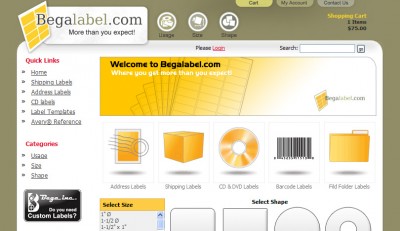
Begalabel.com has completed our homepage design update. We announced it back in may:
http://blog.begalabel.com/2009/05/24/begalabelcom-redesign-coming-soon/
We really believe that our redesign will meet all of the requirements we felt we needed to improve the shopping experience for you, our customers. We are now moving on to phase two of our redesign as we work with the details of our shopping interfaces.
Please let us know what you think of our new design.
Please feel free to leave comments and suggestions!
Filed under: News & Updates on July 24th, 2009 | No Comments »